World of Warcraft 2.4.3
Use this if you do not have a clean TBC client yet. Download the client first, extract it, then add the Supreme-WoW patch files into the correct language folder.
Download WoWEverything you need to join the PvP realm: full TBC client, language patch files and step-by-step install instructions for ENUS and ENGB clients.
Use this if you do not have a clean TBC client yet. Download the client first, extract it, then add the Supreme-WoW patch files into the correct language folder.
Download WoWThis patch contains the custom realm content: snowy Shop, updated Warsong Gulch and Arathi Basin, MoP/WotLK inspired skins, flying mounts and ground mounts. Choose ENUS or ENGB below.
Choose Patch VersionDownload this file if your client uses the enUS folder. Follow the ENUS instructions below and place the file into the correct Data/enUS directory.
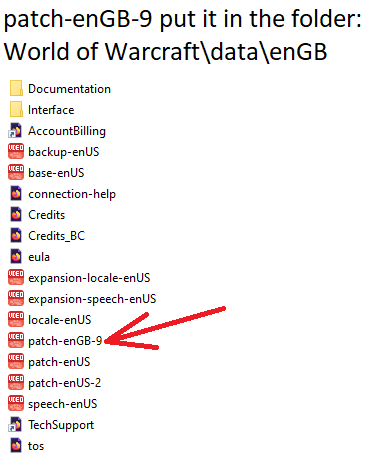
Download ENUSDownload this file if your client uses the enGB folder. Follow the ENGB instructions below and place the file into the correct Data/enGB directory.
Download ENGBThe mall/shop map has been rebuilt with a stronger winter atmosphere.
Warsong Gulch and Arathi Basin include custom visual map updates.
Custom skins inspired by Mists of Pandaria and Wrath of the Lich King.
New flying and ground mount visuals are included for custom realm content.
Data/enUS.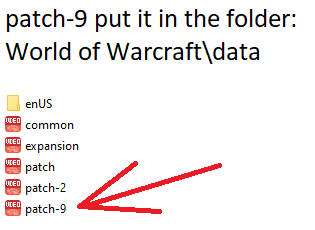
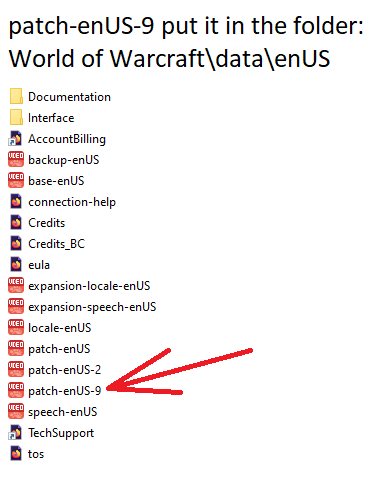
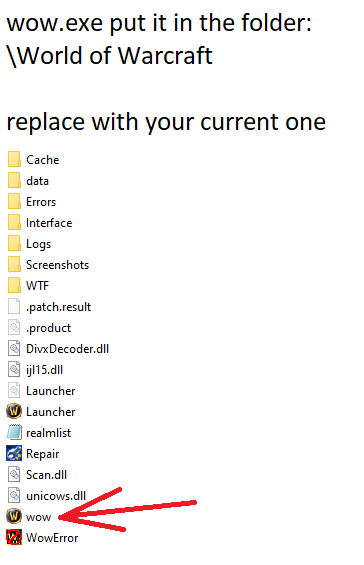
Data/enGB.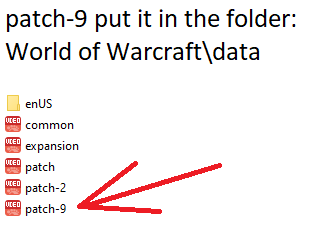
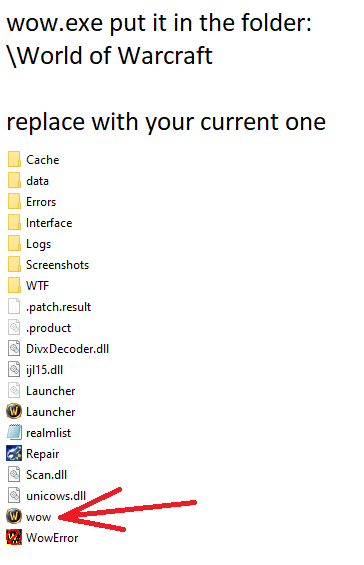
Send us a screenshot of your WoW folder and tell us whether you use ENUS or ENGB. We will help you place the patch correctly.